Hi, sounds really interesting. I understand specs might not be finalised yet, but can you say anything about the module? Like number of I/O, what processing platform you plan to use, will there be an sdk or will it be open to programming?
The BT/Wifi is probably a more advanced feature for people who have experience with rolling their own firmware for microcontrollers. The two packaged apps are a midi-to-cv mode and an o-scope. The community (and maybe microrack, who knows) can make more – Which is part of why I grabbed one myself.
Regarding the module itself: I’ll probably design some sort of cap/cover for the ESP32 module headers because that’s a fast way to fry things. This is the one module where if you’re letting a relatively new friend jam on your microrack, you have to be watching.
EDIT: The headers aren’t soldered in, so to access them, you’d have to use a male-end cable or solder the headers on yourself. This is a good thing, as it prevents accidental connection.
BT/WiFi are indeed available to use on the hardware level in current version of the module design, but we are not providing firmware ourselves for that from the start.
We have some ideas (e.g. web-based sequencer) but for now we are focused on the fundamental firmware which is MIDI to CV converter + Oscilloscope.
Unfortunately, ESP chip that currently is available at our supplier is limiting us a bit, and we can’t provide DC coupled Audio interface capability yet on the hardware level. But we plan to replace the chip to more advanced one with better ADC/DAC, so in the future module version it will be possible to develop a firmware to use this moule as Audio Interface.
If you use your DAW with FAC Polyflo as MIDI source and pass this MIDI signals to MICRORACK it should work as intended, with all the MIDI signals being manipulated from your computer.
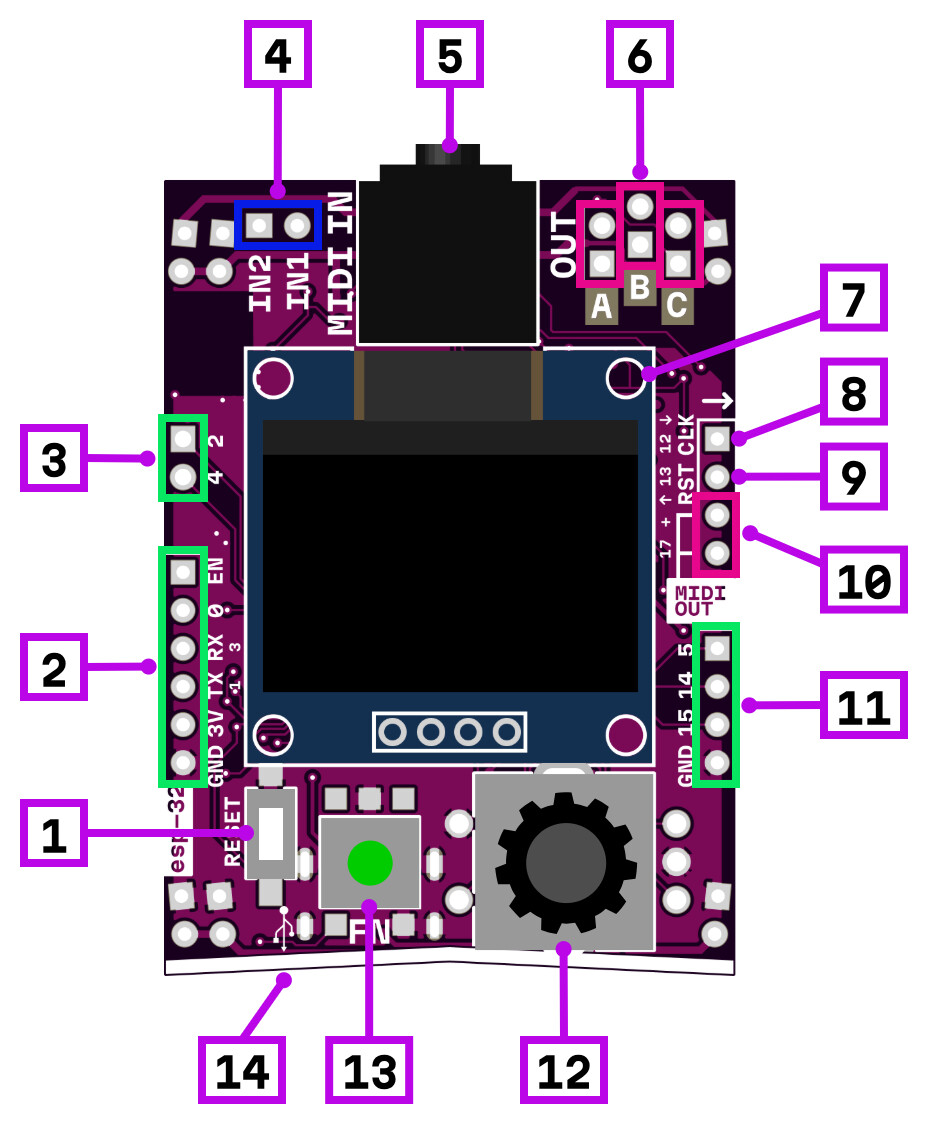
ESP32 module headers (on the sides) are not soldered out of the box, since it’s intended for more advanced usage.
Pre-soldered pins are: IN1, IN2, OUT A, OUT B, OUT C on top and CLK/RST pins on the right.
And by the current usage we had it seems pretty safe. The only problem we had so far was bricked module after incorrect flashing (which still is not hard to fix with esptool and working dump)
That’s a relief. I’ll edit the the above comment for clarity. I’ve seen other projects with rogue headers create issues not just for the end user, but for support.
Just to note. I was able to connect this module to BLE Artinoise midi flute, and latency seems okay but it required a firmware modification (which is expected). There was a pull request in this module’s code repo with BLE MIDI functionality that I could use as a starting point, but it is configured as Server device (suitable to connect to phone or pc).
Meawhile, all my BLE midi controllers (Artinoise Re.corder, Artiphon Orba 2) are Servers too, and I had to rewrite the firmware to make esp32 module to behave as a Client and connect to the first midi ble device it sees. Not sure though that my code is good enough to be merged into a main repo.
Bottomline, it is possible, it works, but at this point requires to get hands dirty (which was the whole point of having an opensource firmware I guess)
I saw the bluetooth midi pull request but failed to figure out how to install it on my module. But I expect only the phone\laptop connection. Would’ve been nice to connect my roli seaboard block directly to microrack, but it probably won’t work on the block side due to custom driver that’s required.
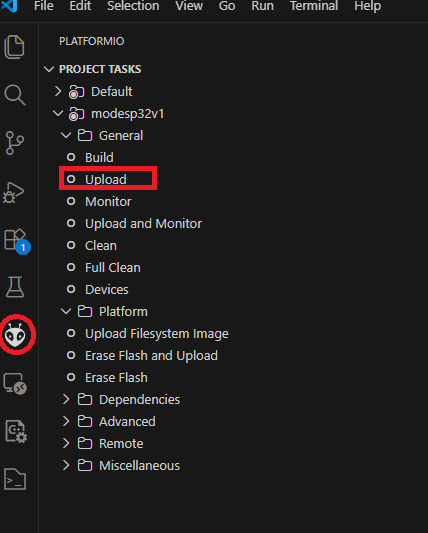
Get module code from github and open folder with VScode
It would take a lot of time to open and initialize, because it would download all the toolchain stuff for ESP32, compilers, libraries, etc.
Connect ESP32 module with type-c cable (I have no idea if it can be on the breadboard at this moment, I had it standalone)
(Actually Upload includes building task)
Build and upload using PlatformIO interface within VScode:
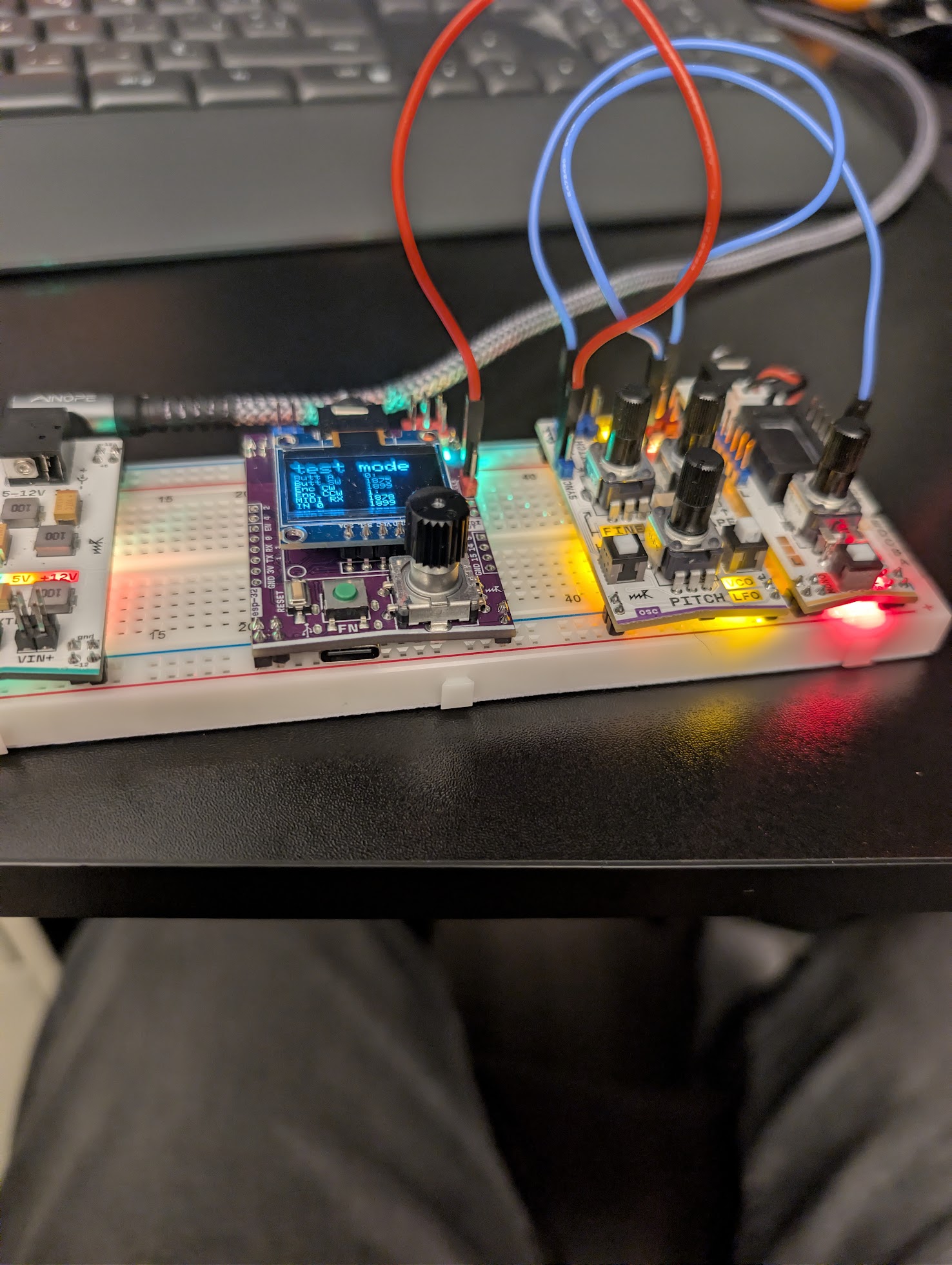
I’m noticing that the MIDI2CV module only gets powered up when I hot plug it on my breadboard…
When I have it connected and power up my Microrack unit I only see a green LED in the right top C output. No display.
I have two breadboards connected to each other in the middle thru the power module.
 Documentation: modules — midi→cv
 Product page: microrack — midi→cv
 Web flasher: ESP32 Firmware Flasher - Microrack
 Firmware link: GitHub - microrack/MOD-ESP32-FW: Microrack MOD-ESP32 firmware